Monthly Archives: June 2010

Reading the ControlLogix System Time in Ladder Logic

Since I’m in the tutorial mind-set right now, I thought I’d mention this little gem. Here’s how you can read the ControlLogix (or CompactLogix) PLC system time into a UDT so you can use the current time value in your ladder logic program.

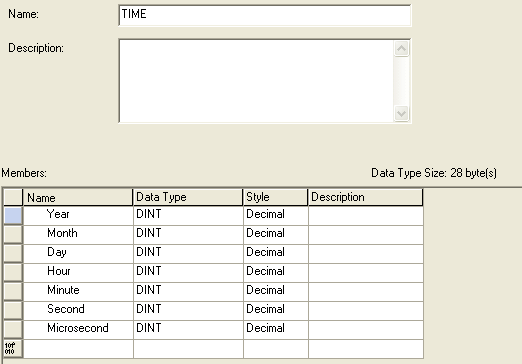
First I created a UDT called “TIME”:

RSLogix 5000 - Read System Time - UDT

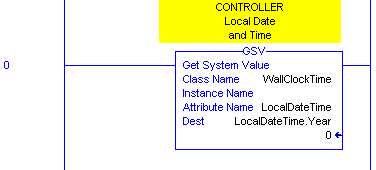
Then you just need to use the GSV (Get System Value) instruction with the WallClockTime class, and LocalSystemTime attribute to read the controller’s time into an instance of your UDT (here I created a new tag called LocalDateTime of type TIME). Note that I used the Year element of the LocalDateTime tag as the parameter, because that’s the first address of the tag. It starts writing there but fills in the entire UDT with the time values:

RSLogix 5000 - Read System Time in Ladder Logic

Now you can program your sprinklers to turn on and off in the middle of the night! 🙂


The Five Rung Logic Block

I’m still working on my RSLogix 5000 Tutorial, and I decided to include a brief introduction to a Five Rung Logic Block. If you’re like me, the first time you saw or heard about a five rung, you thought it was was a ludicrous amount of logic just to move a cylinder from one position to another. However, I realized most of my non-five-rung motion control logic always ended up being as complicated, or more complicated, than if I’d used a Five Rung from the beginning, so now I’m a convert.

A five rung block is named after the five coils that make up each block (these names differ between programmers and organizations, but they follow this pattern):

  • Safety
  • Precondition (aka Trigger)
  • Command
  • Complete (aka “In Position”)
  • Fault

Briefly, your safety rung contains all the conditions that must be present during the entire motion. You put conditions like “no critical faults” here. You also put conditions such as interfering axes clear here. For instance, if axis A and axis B should never advance at the same time, then put A Retracted in the safety rung for the five rung that moves axis B to the Advanced position, and vice-versa. This is your “sanity check” logic.

The “trigger”, or “precondition” rung is the signal that will initiate automatic motion. You can put auto conditions directly in this rung, or you can tie in auto mode sequence logic from elsewhere. The difference between the Safety rung and the Trigger rung is that the Safety rung has to stay on during the entire motion, but the Trigger run only has to be true to initiate the motion.

The Command rung is usually a sealed in coil that turns on while the machine should be trying to move this axis to this particular position. Sometimes this is synonymous with an output itself, but in many cases the Command coil will then be used to drive one or more outputs or motion instructions.

The In Position (sometimes called “complete”) rung condition is the logic that interprets the sensors to tell us that we’re actually in the given position. It’s handy to use this coil throughout your program to indicate the state of the machine, rather than looking at the inputs directly. That allows you to invert input logic or add debounce logic later in just one place, rather than everywhere that depends on this machine state.

Finally, the Fault condition is normally a timeout fault. If the command coil is on too long without seeing the In Position signal, then we determine that the motion timed out, and we stop trying. We use this fault in our alarm logic as well.

Once the command condition becomes true, it’s normally sealed in until one of three things happens: the safety condition changes to false, the motion completes and the In Position signal changes to true (normal), or the motion times out and the Fault condition changes to true.

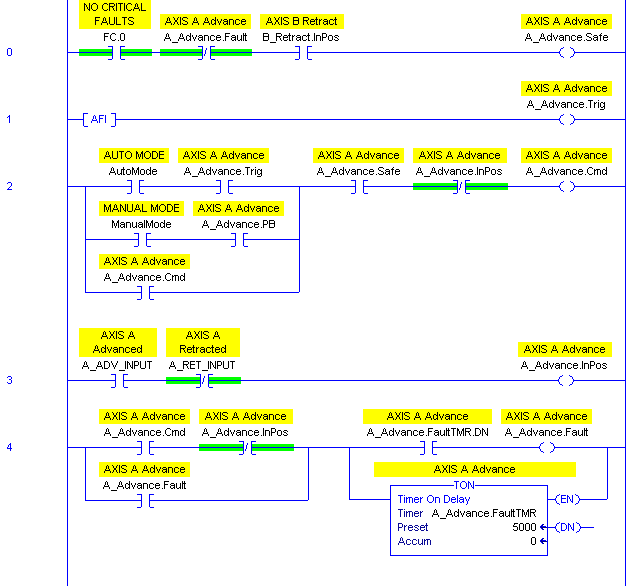
Here’s what a generic five rung logic block looks like. I left an AFI in the trigger rung because you normally come back and fill in that logic later. Note that this is only to move one axis to one position:

RSLogix 5000 Tutorial - Generic Five Rung Logic Block

The “PB” bit in the command rung is the HMI pushbutton that initiates motion to this position while you’re in manual mode. Note that both manual mode motion and auto mode motion have to follow the same safety conditions, but just have different trigger conditions.

You have to customize it for each situation. The contents of the safety and trigger rungs are obviously unique, but the command rung sometimes changes depending on the scenario. You may have more than just manual and automatic modes. Some automatic actions may actually happen when you’re not in automatic mode. Sometimes you may want an axis to “jog” (for instance a hydraulic axis moves slow, and you may want it only to move in manual mode if you hold your finger on the button) and in that case, you couldn’t seal in the Command bit around the manual mode pushbutton (you’d just seal it in around the trigger contact).

There are other variations. I hope you find this useful. If nothing else, when you come across this logic in someone else’s program, you’ll have a better idea of how it works.

Industrial Automation Knowledge Sharing, Revisited

About 6 months ago I blogged about ControlsOverload, a knowledge-sharing Q&A site for the Industrial Automation community: Make More Money with ControlsOverload.

I was pleased to read Bill Lydon’s article in InTech called Putting knowledge to work. Bill shares a story similar to what many of us have experienced:

Early in my career, I ran up against an automation systems software problem I could not figure out. Being the “new guy” in an open office with five other engineers who had experience with these systems, I decided to get their input and explained the problem as best I could. They had suggestions, but no one offered a solution. After working on the problem for a few days, I discovered some software code that only executed under certain system circumstances, which was creating the problem. I changed the code to get the system in the field working properly and wrote an engineering change request.

I proudly shared the solution with the group. One of the most knowledgeable and experienced engineers exclaimed, “I solved that problem months ago!” Pulling out a folder from his desk file drawer, he announced his notes on the solution were, “right here.” I asked why he did not tell me this a few days before, and he responded, “You didn’t ask the right question about this specific code.” I learned this was normal operating procedures with him because he believed withholding knowledge created job security.

That’s exactly the reason why ControlsOverload was created. I’ve seen the impact of withholding knowledge, and it’s painful. Engineers are entering the industrial automation career path all the time and all of them have to re-learn the same lessons over and over because older generations aren’t taking the time to share their knowledge and mentor. It’s the opposite of the behavior that built our civilization. We need to pass these expensive lessons on to the next generation so they can spend more time building better things than we ever could.

One-on-one interaction and teaching is good, but social networking adds an economy of scale that allows knowledge sharing to explode. But somebody has to take the time to seed the field before we get our first harvest.

Beckhoff TwinCAT: a First Impression

Those of you who know me remember I’ve been itching to get my hands on a Beckhoff TwinCAT PLC industrial control system for a few years now, but I never found a project or customer willing to take on the risk of trying something new. Like a bunch of penguins on a cliff of ice, nobody wanted to be the first in the water.

I’ve recently had the opportunity to apply a TwinCAT PLC and HMI system to a relatively low-risk application, so I finally have something to share. Those of you who know me also know I don’t pull my punches when I talk about products, so here’s an honest review of the TwinCAT system: the good, the bad, and the ugly.

Benefits

Cost

What draws you to TwinCAT is its combination of low cost with a ton of features. I can’t publish prices, but I encourage you to compare prices from Beckhoff, Allen-Bradley, Omron, and others. Beckhoff offers a similar or better feature-set, with as many or more communication options than it’s competitors, for significantly less money (it’s real-time PC control instead of dedicated hardware). On specs it can do everything, and doesn’t bend you over the table when it comes to the price.

Scalability

First, Beckhoff TwinCAT PLC takes advantage of a PC CPU and memory, which means you can scale up the performance of your system for a fraction of the cost of scaling up to large PLC and PAC systems.

Secondly, if you use EtherCAT, you get to scale up your I/O sizes without as much impact on performance or price. The individual I/O slices are significantly cheaper than for other bus technologies, and the servo drives are less expensive because the bus speed is fast enough to close the loop from the PLC rather than in the device itself.

Where TwinCAT really shines is when you need to integrate it to the MES layer in your organization. Most other vendors require you to buy expensive OPC or other connection software, but Beckhoff provides a free DLL for Windows applications to communicate with the PLC over a communication protocol called ADS. (They also provide an OPC server as an add-on if you need it.)

What’s the Catch

Switching software vendors is never easy. If you’re used to your existing PLC software like RSLogix, you’ve got a bit of a learning curve ahead of you. Here are the things that down-right annoyed me about TwinCAT when I was coming from the RSLogix/PanelView realm:

  • When you do an online edit, it resets all of your forces. You have to reload your watch list to re-apply them. (Fortunately I always write perfect code the first time, so I never had to do an online change…)
  • The ladder logic editor doesn’t seem to auto-wrap (unless I’m missing a setting somewhere)
  • The HMI editor crashed a couple of times when I was modifying the HMI, and I had to restart the TwinCAT system (not the PC, just the software)
  • The English documention is lacking
  • The TwinCAT System Manager DeviceNET master configuration had a bug where it wouldn’t recognize EDS files where the Class value was stored as a 16 bit, rather than an 8 bit value. The EDS file was valid, according to EZ-EDS, but it wouldn’t read it. Changing the value to 8-bit made it recognize the parameter. This made it hard, but not impossible, to integrate an Allen-Bradley Point I/O DeviceNET node.
  • Even though the HMI will log an alarm history, there’s no alarm history control for you to view it in the HMI itself (it’s saved to a CSV file)

Here are some things that are just really different, but I’ve had no trouble adapting to:

  • You have to define all variables (tags) in a text syntax, instead of in a spreadsheet-like tag editor
  • I/O isn’t mapped directly. You define your hardware I/O and your program I/O and then you map them.
  • You don’t do online changes while you’re online with the PLC. You “log off”, then make your change, and then “log on” and tell it to upload your change. (You can do this while the machine is running.)

What’s Cool

Using a PC based controller opened up some interesting features, particularly in the HMI:

  • You can launch another application from a button click on the HMI (Excel, etc.)
  • You can configure some interesting alarm actions, like launching a program, or sending an email
  • There’s an (optional) add-in to let the PLC communicate in a limited fashion with a SQL Server
  • It runs on commodity hardware. PC hardware is cheap and you can get much larger touch screens for a lot less than the cost of an equivalent PanelView. The “fieldbus” card (EtherCAT) is under $100. Even a Beckhoff EtherCAT to DeviceNET master solution is cheaper than a straight-up DeviceNET card from another manufacturer.
  • TwinSAFE – a Safety Controller sitting right on your fieldbus for less than a stand-alone safety controller from another vendor.

Support

I had nothing but superb support from the local Beckhoff technical support guys during this experience. They respond to emails personally usually within a couple of hours, and they have no problem taking the two hour drive to see us if we have any issues that can’t be resolved over the phone or with email. We’re not a “big” customer in any way.

Summary

I’ve just spent about 2 weeks coming up to speed on TwinCAT, having come from an AB/Omron background, with a smattering of other PC based controllers like Phoenix Contact’s Visual Logic Controller (VLC) and MultiProg (formerly PCWorx).

The ease-of-use of TwinCAT doesn’t measure up to RSLogix, but it’s comparable to Omron, and it blows products like PCWorx/MultiProg out of the water (I think I was using version 3 of PCWorx, and I know there’s a version 5 now). Most of my issues with TwinCAT are that its ladder editor just isn’t polished enough compared with RSLogix, but that’s not surprising given its roots in Germany. North America tends to favor ladder logic, where Europe seems to favor instruction list, structured text, and function block diagram. It feels like the TwinCAT ladder logic editor was neglected a bit, but it is certainly workable. Comparing the TwinCAT sequential function chart editor with the RSLogix sequential function chart editor, they were actually reasonably close. I liked that I didn’t have to position individual steps in TwinCAT – it just auto-arranged everything for me.

Price-wise, TwinCAT is significantly less expensive than any other serious player in the industrial automation equipment space, particularly when you start ramping up the amount of I/O and drives you need, and it has similar (and in some cases better) features to offer. It’s even significantly less expensive than the Phoenix Contact solution (from my memory), and given that, there’s no reason I’d ever recommend a PCWorx/MultiProg solution from Phoenix Contact. The Phoenix offering is worse and more expensive.

If you’re in a position where your facility is in the market for a new automation platform, I definitely recommend including the Beckhoff TwinCAT platform in your deliberations. It hits a really unique sweet-spot on price, flexibility, and features that nobody else seems to be able to offer right now. Now that we’re a few weeks in, we have a running machine, it looks like the project will be successful and I have no reservations about saying: if you don’t mind learning something new, give them a try.
Format Shift

In case anyone out there is doubting my absolute nerdiness, I currently have a VCR hooked up to my computer through an NTSC to USB converter and I’m converting my old VHS copy of Hackers to an mpeg so I can store it on my Windows Home Server and stream it to my TiVo. Any other pseudo-nerd would just use BitTorrent to download a pirated copy of their favorite movies from the internet, but I’m one of those crazy people who think that copyright serves a purpose. At the same time, I absolutely stand behind my right to format shift the digital content I’ve already purchased to new formats.

“Of all the things I’ve lost, I miss my mind the most.”

That’s my rant on format shifting. Interested in robot shifting? Check out Robot Shift – make the move to industrial robots.

Let’s do it again for the last time

This week I did something I’ve probably done a hundred times before, but this time it felt absolutely absurd. It’ll probably be the last time I ever do it.

What was this crazy event? I purchased shrink-wrapped software. It was an upgrade copy of Visual Studio 2010 (upgrade from 2008 Standard Edition).
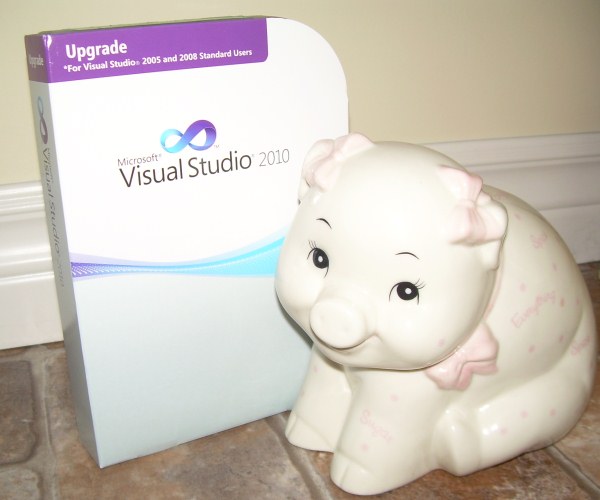
Visual Studio 2010 Upgrade

I had to add a cute little piggybank because otherwise it just looked pathetic.

This little box of bits says it was “made in Puerto Rico”. I guess that means the RTM build was FTP’d to some server in Puerto Rico where it was burned onto a dual layer DVD. In fact it’s likely the DVD’s were burned somewhere else and shipped to Puerto Rico, but anyway, this DVD was then stuffed into plastic case along with a 5×7 piece of heavy stock paper with a beat up yellow sticker on it: the license key.

This plastic case was then stuffed into a cardboard sleeve and shrink-wrapped. It probably made its way to a distribution center before being sold to an online distributor CDW, where it sat on a shelf for a few weeks.

It was at this time that I started hunting around for a Visual Studio 2010 license. I had a copy of VS 2008 and I knew there was a discount for upgrades. You can actually download fully licensed copies from the Microsoft store for $399 (CDN), but I found this boxed copy for about $30 cheaper. Of course I still had to pay S&H, but that was about $13 (UPS Ground).

That was on Friday. Today it’s Monday and I received a call from the local UPS distributor. They’d put it on the wrong delivery truck today, so they wouldn’t be able to deliver it until tomorrow. I wasn’t going to be home anyway, so I told them I’d pick it up tonight after work.

I drove a good 25 km out of my way to go pick it up. The truck wasn’t back from its run yet when I got there, so I stood in line another 20 minutes waiting. I’m not knocking UPS here: their whole system boggles my mind. They knew exactly where this package was 100% of the time, even when it ended up being loaded on the wrong truck, and it was in my hand about 20 seconds after the truck pulled up to the building.

Never underestimate the bandwidth of a UPS truck full of dual layer DVDs.

After installing the software, the first thing it asks you to do is check for updates online. That’s because the version that came on the disk was probably out-of-date before it made it out of Puerto Rico. The only thing I really bought was a yellow sticker with my 16 digit license key on it. I could have downloaded a fully working copy last Friday night, and had it in about 2 hours. It would have worked for 60 days, and you could extend it for another 60 for no cost at all. The only thing of value was the legal right to use this software past the evaluation date. The 16 digit license key is only a proof of purchase.

The absurdity of shipping useless plastic and paper all of the continent, driving out of my way and even standing in line to pick it up, just to “prove” that I paid for a legal license to use the software — it’s really striking isn’t it? What’s crazier is how normal this seemed ten or even five years ago!

It’s not like I wouldn’t have purchased the $399 copy from Microsoft if that’s the only one I could find. I went through this because, well, given the chance to save about $15, I’m just cheap. I guess they figure some people won’t bother to pay money for something they can’t hold in their hand, but aren’t we past that now? Apple figured it out. Look at the iPhone App Store, and iTunes.

If I relate this story to my daughter ten years from now, she’ll think I’m nuts. You bought software how? Why?!?

Well, good riddance, shrink-wrapped software. Rest in peace.