Archive for September 2010
I’ve recently been reading Clean Code: A Handbook of Agile Software Craftsmanship. It’s written by Robert C. “Uncle Bob” Martin of Agile software (among other) fame. The profession of computer programming sometimes struggles to be taken seriously as a profession, but programmers like Martin are true professionals. They’re dedicated to improving their craft and sharing their knowledge with others.
The book is all about traditional PC programming, but I always wonder how these same concepts could apply to my other obsession, ladder logic. I’m the first to admit that you don’t write ladder logic the same way you write PC programs. Still, the concepts always stem from a desire for Readability.
Martin takes many hard-lined opinions about programming, but I think he’d be the first to admit that his opinions are made to fit the tools of the time, and those same hard-and-fast rules are meant to be bent as technology marches on. For instance, while he admits that maintaining a change log at the top of every source file might have made sense “in the 60′s”, the rise of powerful source control systems makes this obsolete. The source control system will remember every change that was made, who made it, and when. Similarly, he advocates short functions, long descriptive names, and suggests frequently changing the names of things to fit since modern development environments make it so easy to rename and refactor your code.
My favorite gem is when Martin boldly states that code comments, while sometimes necessary, are actually a failure to express ourselves adequately in code. Sometimes this is a lack of expressiveness in the language, but more often laziness (or pressure to cut corners) is the culprit.
What would ladder logic look like if it was “clean”? I’ve been visiting this question during the development of SoapBox Snap. For instance, I think manually managing memory, tags, or symbols is a relic of older under-powered PLC technology. When you drop a coil on the page in SoapBox Snap, you don’t have to define a tag. The coil is the signal. Not only is it easier to write, it prevents one of the most common cardinal sins of beginner ladder logic programming: using a bit address in two coil instructions.
Likewise, SoapBox Snap places few if any restrictions on what you can name your coils. You don’t have to call it MTR1_Start – just call it Motor 1: Start. Neither do you need to explicitly manage the scope of your signals. SoapBox Snap knows where they are. If you drop a contact on a page and reference a coil on the same page, it just shows the name of the coil, but if you reference a contact on another page, it shows the “full name” of the other coil, including the folders and page names of your organization structure to find it. Non-local signals are obviously not local, but you still don’t have to go through any extraneous mapping procedure to hook them up.
While we’re on the topic of mapping, if you’ve read my RSLogix 5000 Tutorial then you know I spend a lot of time talking about mapping your inputs and your outputs. This is because RSLogix 5000 I/O isn’t synchronous. I think it’s pointless to make the programmer worry about such pointless details, so SoapBox Snap uses a synchronous I/O scan, just like the old days. It scans the inputs, it solves the logic, and then it scans the outputs. Your inputs won’t change in the middle of the logic scan. To me, fewer surprises is clean.
I’ve gone a long way to make sure there are fewer surprises for someone reading a ladder logic program in SoapBox Snap. In some ladder logic systems, the runtime only executes one logic file, and that logic file has to “call” the other files. If you wanted to write a readable program, you generally wanted all of your logic files to execute in the same order that they were listed in the program. Unfortunately on a platform like RSLogix 5000, the editor sorts them alphabetically, and to add insult to injury, it won’t let you start a routine name with a number, so you usually end up with routine names like A01_Main, A02_HMI, etc. If someone forgets to call a routine or changes the order that they execute in the main routine, unexpected problems can surface. SoapBox Snap doesn’t have a “jump to page” or “jump to routine” instruction. It executes all logic in the order it appears in your application and each routine is executed exactly once per scan. You can name the logic pages anything you want, including using spaces, and you can re-order them with a simple drag & drop.
Program organization plays a big role in readability, so SoapBox Snap lets you organize your logic pages into a hierarchy of folders, and it doesn’t limit the depth of this folder structure. Folders can contain folders, and so on. Folder names are also lenient. You can use spaces or special characters.
SoapBox Snap is really a place to try out some of these ideas. It’s open source. I really hope some of these innovative features find their way into industrial automation platforms too. Just think how much faster you could find your way around a new program if you knew there were no duplicated coil addresses, all the logic was always being executed, and it’s always being executed in the order shown in the tree on the left. The productivity improvements are tangible.
innovation · ladder-logic · plc · rslogix-5000 · snap
I’ve had my head down working on SoapBox Snap recently (an open source, free ladder logic editor and runtime for your PC), so I decided it was a good time to come up for air and write a blog post. A lot has happened with Snap since I posted the sneak peek back in July. I’ve flushed out a good ladder logic instruction set, online debugging is working, and you can now execute the runtime as a Windows service, so it’ll keep running your logic in the background, and even auto-start when Windows starts.
It’s been a long time to get a first version out the door, but it’s always been the plan to adopt an agile workflow after release. That is, short release cycles and continuous small improvements. In fact, that’s what I’m going to talk about… why not to use agile releases during the initial development.
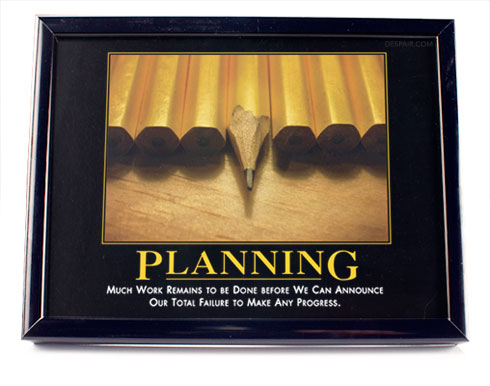
The image above is currently my September calendar picture at work, which made me think of this. Please click on the image to go to Despair Inc. and take a look at their stuff. It’s hilarious.
Writing SoapBox Snap took a lot of planning and design:
I started by tackling online programming. Downloading the entire application every time there’s a change won’t scale as the program grows. That is, how do you design a data structure such that I can modify it locally, generate a packet of data that only contains the difference between this version and that last version, transfer that change over a communication channel, and reconstruct the new version on the other end given the previous version and the difference? I created a library for building this type of data structure, and the communication protocols to make it work, and I packaged it in a library called SoapBox.Protocol.Base. Then I build a data structure for automation programs on top of that and put it in a library called SoapBox.Protocol.Automation. If you follow standard software architecture terminology, I now had my “Model”.
Then I decided to tackle how to make an extensible editor and runtime. I wanted other people to be able to extend SoapBox Snap with new ladder instructions and other features, so extensibility had to be built-in from the ground up. After looking at the various technologies, I settled on .NET’s new Managed Extensibility Framework (MEF), which was only recently released in .NET 4. After playing with it for a while, I realized that part of what I was building was applicable to anyone making an editor-like application with extension points. I decided to encapsulate the “framework” part of it into a re-usable library called SoapBox.Core, and I released it as open source and posted an article on CodeProject about how to use it. Over several months, people have started downloading, using, and even contributing changes back to SoapBox Core to improve it. We’ve setup a Q&A site for people to ask questions, get help, and give feedback.
Armed with a Model, and a Framework, I set off to build SoapBox Snap. At times I made some wrong turns, or started down some dead-ends, but I had a good vision of what I wanted to build. There were nights where I went to bed feeling like I’d banged my head against the keyboard for a few hours and accomplished nothing, but every morning brought a fresh perspective, idea, or insight that helped move the project forward. I didn’t accept any compromises on the core features that affect everything else, like undo/redo. If you don’t get undo/redo right at first, adding it in later means major architectural upheaval.
Ironically, the first problem I solved at a base level, online programming, is only half-implemented in this first version. However, since everything is already there to support full online programming, no major architectural changes have to be made to add it later. My approach was decidedly “bottom-up”. Agile is “top-down”. Would Agile have worked better for this project, or was I right to take a bottom-up approach?
I believe Agile has one failure point: interoperability (and SoapBox Snap is all about interoperability). If you have one closely-knit team doing the development and they’re the only ones that will ever interact with the edges of this application, then I think Agile works well. On the other hand, when you have extensibility points, API’s, or common file formats that 3rd parties are depending on, then doing the kind of massive refactoring that’s required to iteratively change a one-month-old barely-working application into a fully developed one is either going to break the contracts with all 3rd parties, or you’re going to have to support broken legacy interfaces for the rest of your application life cycle. Spending the extra time to build your application bottom-up, and releasing a relatively stable architecture to 3rd parties with working extensions and file formats greatly reduces the friction that Agile development would have caused.
At any rate, we’ve waited long enough. It’s almost over: look for it to be released in early October. I can’t wait to see what people will do with it.
9
Off-the-Shelf or Custom Automation?
No comments · Posted by Scott Whitlock in Industrial Automation
If you’re like me, you’re a fan of customizing:
…and certainly in the automation industry you see a lot of custom control solutions. In fact there’s always been this long-running debate over the value of custom solutions vs. the value of off-the-shelf “black box” products.
I’ve noticed this rule: the closer you get to the production line, the more custom things you’ll see. Just look at the two ends of this extreme: production lines are almost always run by PLCs with custom logic written specifically for that one line, but the accounting system is almost always an off-the shelf product.
There’s a good reason for this. Accounting methodologies are supposed to be standardized across all companies. Businesses don’t claim that their value proposition is their unique accounting system (unless you’re talking about Enron, I suppose). Automation, however, is frequently part of your business process, and business processes are the fundamental business proposition of a company. Fedex should definitely have a custom logistical system, Amazon needs to have custom order fulfillment, and Google actually manufactures their own servers. These systems are part of their core business strengths.
So when should a company be buying off-the-shelf automation solutions? I say it’s any time that “good enough” is all you need. You have to sit down and decide how you’re going to differentiate yourself from the competition in the mind of your customers, and then you have to focus as much energy as possible on achieving that differentiation. Everything else needs to be “good enough”. Everything else is a cost centre.
If you follow that through logically, it means you should also seek to “commoditize” everything in the “everything else” category. That bears repeating: if it’s not a core differentiator for your company, you will benefit if it becomes a commodity. That means if you have any intellectual property sitting there in a non-critical asset, you should look for ways to disseminate that to the greater community. This is particularly important if it helps the industry catch up to a leading competitor.
There are lots of market differentiators that can depend on your automation: price, distribution, and quality all come to mind. On the other hand there are other market differentiators that don’t really depend on your automation, like customer service or user-friendly product designs. Ask yourself what category your company fits in, and then you’ll know whether custom automation makes sense for you.
1
Quick thoughts about Automation
No comments · Posted by Scott Whitlock in Industrial Automation
I think that once you’ve been in this industry for a few years, you need to reach out to others to share some of the wisdom you’ve learned. Most of the knowledge we carry around can do other people a lot more good than it will do us again in the future, so sharing needs to be a cultural norm. With that thought in mind, here are some quick automation-related thoughts I’d like to share:
- Inexperienced engineers appear to work faster, but their solutions are less maintainable. [tweet this]
- Choose open systems over proprietary, when possible [tweet this]
- Automate your own job ruthlessly before to automate anything else. It pays back. [tweet this]
- Beware of employers who spend 30 minutes reprimanding you about a 15 minute line on your timesheet. [tweet this]
- If you can’t find a more powerful tool, make your own. [tweet this]
- When estimating a project, if you’re counting in hours, you’re not being realistic. Use half-days. [tweet this]
- Don’t take shortcuts writing a program if it’s at the expense of readability. It doesn’t pay off. [tweet this]
- Automation doesn’t help if you don’t understand the process you’re automating. [tweet this]
- Blame is reactive. “What can we do differently next time?” is proactive. [tweet this]
- Innovate is a verb. This is not a coincidence – it requires constant action. [tweet this]
- Make things of value, not emails. [tweet this]
Feel free to share your own nuggets of wisdom below.


