Monthly Archives: August 2011

Outdoor G-Scale Garden Railroad: Detecting the Trains

A little while ago I told you about an ongoing project to automate my parents’ G-Scale outdoor model railroad. Today I’m going to add a bit more detail about the solution: specifically, how do you sense the location of the trains?

Layout

The layout is broken into 3 lines: a “Figure 8” line, a “Point-to-Point” line, and a “Main Line”, which has various track switches, sidings, etc. The interesting thing about the Figure 8 and Point-to-Point lines is that they cross, and one of the goals is to prevent trains from colliding.

Some other goals include:

  • The point-to-point should start at one station, move to the other station, stopping out of site for a while. It should stop at each end-station for an adjustable period of time, and return.
  • The Point-to-Point and Figure 8 lines have uphill and downhill sections, so the speed needs to be varied in these sections.
  • The Figure 8 line has two programmable stops, but the train shouldn’t necessarily stop at both stops every time.
  • We want to run multiple trains on the main line. Some will be stopped on a siding while others are running, and then they will switch.
  • All tracks need the ability to be manually operated.
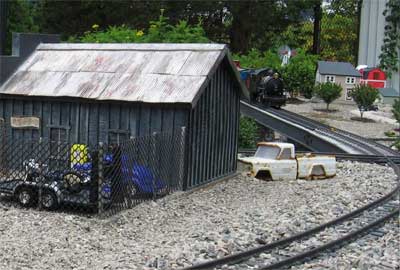
The Figure 8 Line from behind "Stan's Speed Shop"

Power

All existing locomotives in the system use “track power” (DC voltage applied across the two rails of the track). The voltage applied to the track is applied to the motors in the locomotives, and this controls the speed.

There are some advantages to this: it allows you to run “stock” (unmodified) engines, and it’s compatible if someone wants to bring over a “guest” engine (either a track powered or battery powered model). It’s also compatible with “DCC” controlled locomotives which, as I understand it, are backwards compatible with track powered systems.

Control?

Whether you use a PLC or a PC for control, being able to control the voltage to a track (to control a motor speed) is pretty much a solved problem, so let’s assume we can do that for now. The main problem is location sensing. In order to tell the locomotives to stop, wait, start, etc., you need to know where they are.

Your first thought, as a controls engineer, is some kind of proximity sensor. Unfortunately there are some significant problems with this:

  • Metal-sensing proxes are expensive, and the locomotives are mostly plastic. We’re trying to avoid retrofitting all locomotives here. You might be able to sense the wheels.
  • Photo-sensitive (infrared) detectors, either retro-reflective or thru-beam type, are popular on indoor layouts, but they apparently don’t work well outdoors because sunlight floods them with infrared.
  • Reed switches are popular, but you need to fit all your engines with magnets, and they are a bit flaky. Magnets and reed switches actually work well if you have the magnet on the track, and the reed switch mounted to the engine, in order to trigger whistles, etc., but even then they’re not 100% reliable, in our experience.
  • All proximity detection strategies require you to run two wires to every sensor, which is a lot of extra wiring. Remember, there are lots of little critters running around these layouts, and they tend to gnaw on wires. Fewer wires is better.
  • Having sensors out in the layout itself means you’re exposing electrical equipment to an outdoor environment. At least you can take the locomotives in at night, but the sensors have to live out there year-long. I’m a bit concerned by that thought.

Solution: Block Occupancy Detection

The solution we found was a technique called “block occupancy detection.” This is a fairly common method of detection in some layouts. A couple of years ago, I built a simple controller that solved the crossing detection problem between the Figure 8 and Point-to-Point lines using block detection to know where the trains were. It worked great, so we decided to use it for the entire system.

Here’s how it works: you divide up your track layout into “blocks”. Blocks can be any size, but they are typically anywhere from about 4 feet long, up to the length of a train, or a bit more. One rail on the line is “common” and isn’t broken up. The other rail is the one you cut into electrically isolated sections.

So, the wire from the common side of your speed controller goes directly to the common rail, as it did before. However, you have to split the “hot” side of your speed controller into as many circuits as you have blocks. Each block is fed from a separate circuit, which means you have to run a “home run” wire from each block back to your power supply.

Then, the “block occupancy detection” circuit is wired in series with each block circuit (between the speed controller and the block). Here’s what one block detection circuit looks like:
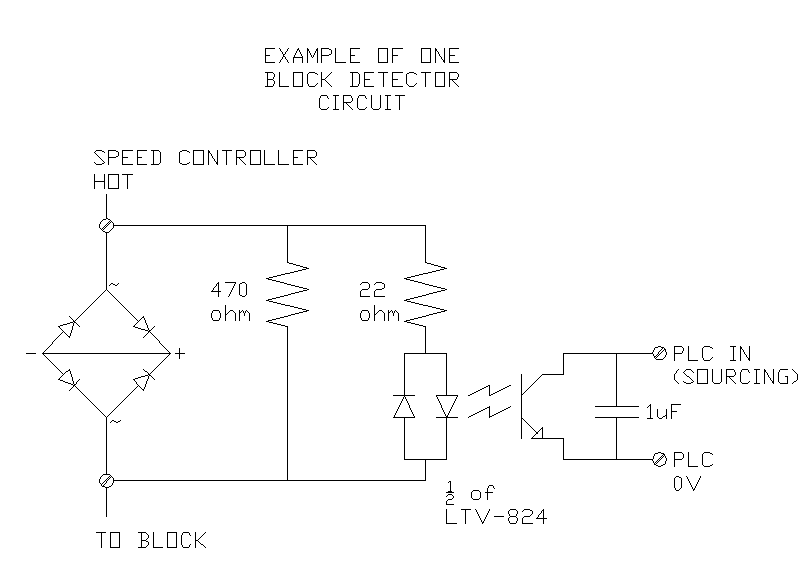
This is an interesting circuit. On the left you can see a bridge rectifier, with the + and – terminals curiously shorted out. This is a hacked use of the device. All we really care about is that we want to create a voltage drop across the device when current is flowing through the wire to that block. One diode creates a voltage drop of 0.6 to 0.7 V, and the way we’ve wired it, whether the speed controller is in forward or reverse, the current always has to take a path through two forward-biased diodes. That means, when current is flowing to the block (i.e. there’s an engine in that block) then we get a voltage drop of 1.2 to 1.4 V across this device (or -1.2 to -1.4 V if it’s in reverse). A standard bridge rectifier is just a handy component to use because it’s readily available in high current ratings for a couple of dollars each.

We’re using that constant voltage to drive the input side of an LTV-824 opto-isolator chip. Notice that it’s a bi-directional opto-isolator, so it works in forward or reverse too. On the output side of the opto-isolator, we can run that directly into a PLC input (the input we’re working with here is sourcing and has a pull-up resistor built-in).

If you’re using a regular straight-DC analog controller, that’s all you need, but in this case we’re using a pulse-width-modulated (PWM) speed controller. That means the PLC input is actually pulsing on and off many times a second, and if you’re at a slow speed (low duty cycle), then the PLC may not pick up the signal during it’s I/O scan. For that reason, I found that sticking a 1 uF capacitor across the output will hold the PLC input voltage low long enough for it to be detected quite reliably. This, of course, depends on your pull-up resistor, so a little bigger capacitor might work better too.

Filtering in the PLC

This worked quite well, but needed a bit of filtering of the signal in the PLC. The input isn’t always on 100% while the locomotive is in the block, so once a block is latched as “occupied”, I use a 1-second timer of not seeing the input on before I decide that the block is clear.

I also have to see an adjacent block occupied before I clear a block. That solves the problem of “remembering” where an engine is when it stops on the track and there’s no longer any current flowing to that block.

Of course, this means you can end up with “ghosts” (occupied blocks that are no longer truly occupied because someone picked up a locomotive and physically moved it). I provided some “ghost-buster” screens where you can go in and manually clear occupied blocks in that case.

Pros and Cons

I like this solution for several reasons: all the electronics are at the control panel, not out in the field (except the wires to each block, and the track itself). Also, the components for one block detector are relatively inexpensive, and we’re working on a bit of a budget here (it is a hobby, after all). I think reliability and simplicity also fall into the Pro column. As long as you can get a locomotive to move on a segment of track (the track needs cleaning from time to time), then the PLC should be able to detect it. You don’t need to deal with dirty photo-detectors or extra sensor wires. The same wire that carries the current to the block carries the signal that the block is occupied.

On the other hand, there are some negatives. This system, as designed, has 21 different blocks, which means 21 home-run wires, buried in the ground, in addition to the commons (plus the track switch wires, but that’s a story for another post). Also on the negative side, you don’t get 100% accurate position sensing. Actually, you get pretty accurate sensing at the edges of the blocks (you’re pretty sure you know where the locomotive is the moment is crosses from one block to the next), but you’re not sure where it is in the middle of the block.

You do have to make other compromises in the track system. There are some accessories (like lighted end-stops) that draw power from the track. This current draw makes that particular block show up as occupied all the time. You either have to modify the accessory to use battery power, or you have to run extra wires to that accessory.

You also have to take the length of train into account. You know which blocks are occupied by current-drawing locomotives and cars (like lighted observation cars and caboose’s), but not every car draws power. Your design and control system needs to take into account whether or not your train will occupy more than one block at once, and whether the end of the train will be detected. This is most important when trying to run multiple trains on one track, where you want the back train to avoid running into the end of the first train.

Next

I hope that’s been educational. 🙂 I’m still not done programming the PLC, and I’m waiting for a component to arrive for the throttle controller right now. I’ll post more information over the next few weeks.
Sometimes it’s Better to Repeat Yourself

In programming, we have a principle called Don’t Repeat Yourself (DRY). It’s a very important idea, and I’d argue that most of the advances in programming environments over the years have been in support of this principle and its related principle, Once and Only Once (OAOO).

Unfortunately, like every “principle”, it eventually takes on the level of dogma, and the people spouting it sometimes forget why it exists. These principles aren’t ends in themselves; they’re not self-justified. They are general principles to follow, but only when they support the end-goal of solving problems in more efficient, and more maintainable ways.

Let me give you a very simplified example of how it can be carried to far. Consider the following declarations in C#:

const int MOTOR_1_START_TIMEOUT_MS = 5000;
const int MOTOR_2_START_TIMEOUT_MS = 5000;

Consider that I could write:

const int MOTOR_1_START_TIMEOUT_MS = 5000;
const int MOTOR_2_START_TIMEOUT_MS = MOTOR_1_START_TIMEOUT_MS;

or…

const int MASTER_MOTOR_TIMEOUT_MS = 5000;
const int MOTOR_1_START_TIMEOUT_MS = MASTER_MOTOR_TIMEOUT_MS;
const int MOTOR_2_START_TIMEOUT_MS = MASTER_MOTOR_TIMEOUT_MS;

Notice that all 3 versions accomplish the same end-result, but they are semantically different. The first version means that the two motors have independent timeout values, and they’re just co-incidentally the same. The second says, “motor 2’s timeout must be the same as motor 1’s timeout.” The third says that both motors must have the same timeout.

In my opinion, any of these three versions might be correct for various systems involving two motors. However, if you follow the DRY principle without thinking about it, you’ll assert that the first version is incorrect. In fact they’d probably say the only correct version should be:

const int MOTOR_TIMEOUT_MS = 5000;

(…ignoring, for the moment, that it should probably be a configurable value rather than a constant.)

Why does this simple example matter? Consider the case of a PLC-based control system with 10 motors. Let’s say at the start that all the motors, and all the drives running them, are identical. If you’re familiar with my philosophy of PLC programming, you know that my default solution for this would be to have 10 ladder logic routines, each called MOTOR_01, MOTOR_02, etc. Each routine would basically be a copy. That really doesn’t follow the DRY principle, does it? Certainly no, not at face value.

You might not believe it, but I get the occasional “hate mail” to my blog’s email address because of some of my technical opinions here. The most recent one, comically, referred to me (and all PLC programmers for that matter) as “dinosaurs”. I’m not sure what the rest of the message said, because if you can’t be polite, I’m not going to bother listening to you. However, I believe it’s this flagrant violation of things like the DRY principle that really rubs traditional PC programmers the wrong way when you start to talk about the principles of PLC programming.

Of course, my views about PLC programming are just that – general principles that need to be evaluated in the light of each and every project. I’m just asserting that most of the time you should be following a principle of a one-to-one mapping between ladder logic and real-world hardware. That doesn’t mean it’s an unbreakable rule.

Going back to the 10 motor example, the way you structure your program should be based on a decision you make about anticipated future changes to the system.

If you write one generic routine for controlling a motor, and you call it 10 times, you’re saying, “I always expect all 10 of these motors to behave in an identical way for all of the future.” Of course, you can allow variations, but you have to do that by passing in parameters for each instance. You have to be explicit about what can vary. Adding new parameters is typically a harder task than just modifying one of the 10 existing motor routines when you need to change the behavior of one motor.

On the other hand, if you follow my principle of 10 motor routines for 10 motors, you’re saying, “I expect that we’ll rarely need to make a sweeping change to all 10 motor control routines, but that we are likely to modify one or two routines to make them perform differently than the others.” I personally believe this is usually closer to the truth. As a system ages, perhaps one motor drive will blow, and you can’t buy the original drive anymore, so you have to replace it with a new one that has different control signals. That’s a fairly typical scenario, in my experience. Also, even though you might have 10 identical drives and motors, the process may or may not be identical for each motor. They may perform vastly different functions, and it’s likely that you’ll want to change just one or two of them to access more advanced features of the drive when you refine the process. Of course, I also like that with a one-to-one mapping in a PLC, troubleshooting becomes much easier because with online monitoring you can see each control routine executing just for that motor. You can make temporary changes just to one motor routine to bypass a faulted drive, or to do a million other changes that you’ll never be able to predict when you’re writing the logic.

The fact is, we’re physically limited by the number of drives we have. The amount of time it takes to make a change to all 10 motor control routines is tiny compared to how long it takes to make physical changes to 10 drives. This effort scales with the size of the system. In PC programming, you can have a system with millions, even billions, of objects, but in the PLC world, you’re limited by physical reality. The consequences of repeating yourself aren’t always as great, and you need to take that into account, and weigh it against your other goals.

That doesn’t mean I can’t imagine a case where you really want to assert that the motors all have to operate identically, all of the time, forever in the future. There are systems with load sharing drives where the system wouldn’t operate if you mismatched the drives or motors. That’s a design decision you have to make. Principles are only there for guidance, but they are not absolute rules, and they shouldn’t be treated that way.

Why you should be against Online Voting

So Canada wants to implement online voting. In case you didn’t already know why, here’s why you should be against it.

Vote Selling

If you can cast your vote online from any computer, then you can do it with someone looking over your shoulder. That means you can sell your vote. That means employers can favour employees who actually voted a certain way. One of the best features of our current paper and pencil method is that you can’t sell your vote.

Realistically you *could* sell your vote right now using mail-in cards, but I’m against mail-in votes too, for this reason. At least in that case, you know most people don’t do it.

Easy to Manipulate

Lets assume for a moment that the servers that Elections Canada sets up don’t have any security flaws (unbelievable). At any rate, you still can’t trust the election results because a lot of peoples’ home computers are compromised by botnets. That means there’s malicious code running on millions of computers, and in most cases those computers are available for “rent” to the highest bidder. Once you’ve rented access on those computers, you can run any program you like.

Now, do you think a secure internet connection (using HTTPS) is really secure? In most cases the connection over the internet is secure (stops eavesdroppers), but if someone has access to your computer at home, they’re past the security. If they can run an arbitrary program on your computer, they can manipulate pretty much anything.

For example, lets say you wanted to make clicks for one candidate actually get counted for another. You can do that. It’s called ClickJacking.

That’s just one example. If you have access to the computer, you can recalibrate the mouse (or touchscreen on newer computers). You can capture, log, and report on the user’s keystrokes.

Analogy to Online Banking

People try to counter this argument with analogies to the security of online banking, but that’s flawed. People’s bank accounts do get hijacked using methods like these all the time. The bank account gets cleaned out, and usually the bank refunds the money to the consumer and the loss comes out of their profits. As long as fraud isn’t too high, they can tolerate this. In online elections, you wouldn’t know if your vote had been highjacked. We would just end up with a fraudulent election.

Bottom line

Don’t support online voting, and make sure to explain to everyone else why they shouldn’t support it either. The fact that “the head of the agency in charge of federal elections” thinks this is a good idea means Marc Mayrand obviously doesn’t understand the serious problems inherent in online voting.

Edit: Further reading.

Sneak Peak: Outdoor Model Railroad Automation

Several years ago my parents decided they were going to build a Garden Railroad in their back yard. It’s been an ongoing hobby project since then, and it’s been growing substantially every year:

West Station on the Point to Point Line

This is “G Scale” (around 1:22.5 scale) outdoor model railroading. It’s really a combination of three things: model railroading, building miniatures, and gardening. This recent weekend was the local club’s open-house day, and I was invited along to see many of the layouts. Each layout kind of emphasizes its own focus: some are more focused on gardening, others on the miniatures, etc.

Anyone who does anything remotely related to computers knows that every relative you have thinks you know everything there is to know about computers, and you’re destined to spend the rest of your family holidays removing spyware and running ccleaner on their computers, not to mention reassuring them that it’s OK to reboot the computer to see if the problem goes away.

Being in industrial automation, though, you never get people asking you to automate something; it’s just a little bit too abstract for most people to grasp. However, when your parents get themselves a model train set, they may not know exactly what you do for a living, but they certainly know that if you can program conveyors, robots, and cranes, you should be able to figure out how to make their trains do what they want them to do. Automatically.

Of course, as a control systems guy, you can’t look at your parents’ 24V model train set and not think about how you’d hook up a PLC to it. Especially when they offer to finance the project.

I’m happy to report that we’re progressing well. The goal is to have it running in fully automatic mode before the end of the month. I’ll post some pictures, hopefully some videos, and some technical information about how it was accomplished. Stay tuned.

I Didn’t Learn This in School

Last year I went to my 10 year university reunion. The further I get from graduation, the more I have to discount the value of what I learned there.

Don’t get me wrong, a solid base knowledge in the fundamentals of electronics and some algorithm & data structure knowledge has gotten me out of some tight jams. However, a few days ago my father looked at something I was working on and said, “I guess you did learn something in school!” It was one of those “all-Greek-to-me” comments, but my own reaction was, “I didn’t learn any of this in school.” That startled me a bit. I’ve always argued the opposite, but there it was staring me in the face: most of my job consisted of applying knowledge I’ve learned after school.

When I started thinking about why what I do now didn’t relate to what I learned in school, I realized it’s because the choices you make in real life have longer term consequences.

In university, all of your projects are of very short duration. A term is only 4 months. You have to be able to start a project and complete it in that timeframe. However, at the end of that 4 month project, you throw out the result and start fresh on the next batch of projects. This is fundamentally different than the real world. Every day I deal with the consequences of decisions that I or someone else made years ago.

Over the course of your career you gain experience. As an Engineer or programmer, you learn to generalize. You learn to avoid commitment because you realize how much customers, bosses, and everyone else love to change their minds. Unfortunately you can’t hold off forever. You have to make choices, and I’ve realized a lot of the choices I make are based on my gut feel about what’s likely to change in the future and what isn’t.

For instance, if you need to add a fault timer for a motion, does that go near the logic that controls the motion, or in the fault logic routine? You want to keep things that are likely to change at the same time together. Is it more likely for someone to change the fault timer at the same time that they change other fault logic, or is it more likely that they change the fault timer when they modify the motion logic (personally I think it’s the latter, but it’s not cut-and-dried)?

Another example (acknowledgement to Reg Braithwaite): imagine you’re designing a Monopoly computer game and you’ve chosen to use an Object Oriented design. Traditional OO would suggest that you have a Property class, with a subclass for each concrete property (Baltic, Pennsylvania…), and that each concrete Property has a PurchasePrice value. But does it make sense that the definitions of the prices are distributed among all the different concrete properties? Isn’t it more likely that a rule change, or alternate set of rules would affect all property prices at once? So property prices should be defined in some other class. Unfortunately if you move all the property-related rules to their own classes, then each class has to know about the list of properties. What happens when you want to provide a regional variant of the game with different property names, different currencies, or even a larger board with more properties? Then you have to update all kinds of places because so much depends on the list of properties.

That’s when you have to ask, “what’s more likely to change?” You’re about to make a decision that’s going to pay-off or cost you in the future.

In school you never face this dilemma. You never have to choose the lesser-of-many-suboptimal-choices and live with the consequences of that choice. In the real world you face it every day. The consequences guide the choices you make next time, and so on. Every novice looks at a PLC program and thinks it’s too complicated. Every experienced PLC programmer tries to follow common practices, templates, and guidelines they’ve learned throughout their career because they’ve learned from the consequences of not doing that.

If we could adjust the education system just a bit, maybe students need to have a project that spans multiple terms, and even multiple years. Every term should build on the work you did last time. Every student in a class is given different objectives to achieve every term, and those objectives are assigned randomly. By the end of 4 years, they’ll learn how their choices in first year affected their ability to complete their objectives in fourth year. Then, I think, they’ll be a little more prepared for a career.

Designing Database Tables for Automation People

It may seem like I’ve forgotten about this blog lately, but that’s not the case. The truth is last week I was on vacation, and before and after that I’ve been working on a project tangentially related to home automation, which I’ll probably be posting lots about in a couple of weeks.

However, today I wanted to touch on a topic that many of you will be familiar with: database design. When we talk about database design, we mean a database schema or, more generally, and entity relationship diagram (ERD).

If you do any kind of data logging, or you’re using a database as the data-store for your configuration data, you’ll have to do some kind of database design. Both of these cases call for a “normalized” design. In fact, de-normalized designs are typically only used for heavy-duty data-mining applications, so they’re pretty rare. The advantage of a normalized database is that it follows the “once and only once” (OAOO) software development principle, that says there should be one, and only one, definitive source for any particular fact. So, for instance, don’t store the operator’s name all over the place; rather, store the operator’s name in a table called Operator, include an OperatorId column that’s assigned once when the operator’s row is created but never changes, and then use the OperatorId as a foreign key in your other tables. This gives you several advantages: less database storage (an Id is typically shorter than a name), a single place to change the name (typos are always common and people change their names) and if you do have to change it, you only have to lock one database row to do the edit during the database transaction, instead of every database row that uses this person’s name.

That’s pretty standard stuff, but I want to take a slight tangent. By default, don’t store data you can calculate from other data. This is actually for the same reason. For instance, you wouldn’t store a person’s age, you’d store their birth date. That’s because the age changes all the time. I’m not saying you’d never store a calculated value, but doing so is an optimization, and “premature optimization is the root of all evil.”

Let me give you a real-life example. Lets say you wanted to record the production throughput of an automobile assembly line. Let’s assume you’re already storing the VIN numbers of each vehicle, along with some other data (various part serial numbers, etc.). I’ve seen implementations where someone’s added a new table called LineThroughput, with one row per time period, and a counter in each row (in fairness, I’ve done it too). Every time a vehicle comes off the line, the application finds the applicable row and increments the counter (or adds a new one as required). PLC programmers are particularly likely to do this because we’re used to having limited memory in the PLC, and PLCs come with built-in counter instructions that make this really easy. However, this is a subtle form of denormalization. The database already knows how many vehicles were made, because it has a record for each VIN. All you have to do is make sure that it has a datetime column for when the vehicle rolled off the line. A simple query will give you the total number of vehicles in any time period. If you follow the route of adding the LineThroughput table, you risk having a numerical discrepancy (maybe the database isn’t available when you go to increment the counter, for instance).

Just storing the datetime field has one more advantage: the database is more “immutable”. If data is only written, errors are less likely. If you do want to create a summary table later (for performance reasons because you query it a lot), then you can create it when the time period is over, and once you’ve written the record, you’ll never have to update the row. Again, this is better because the row is “immutable”. The data is supposed to be a historical record. Pretend it’s written in pen, not pencil. (You might be horrified to know that some electronic voting machines seem to use the LineThroughput table method to record your votes, which makes them extremely susceptible to vote-tampering.)

I hope that’s enough information to make my points: normalize your database, don’t record redundant information, or information you can calculate, and avoid situations where you have to update rows repeatedly, particularly if you’re doing data logging.