Since I’m in the tutorial mind-set right now, I thought I’d mention this little gem. Here’s how you can read the ControlLogix (or CompactLogix) PLC system time into a UDT so you can use the current time value in your ladder logic program.
First I created a UDT called “TIME”:
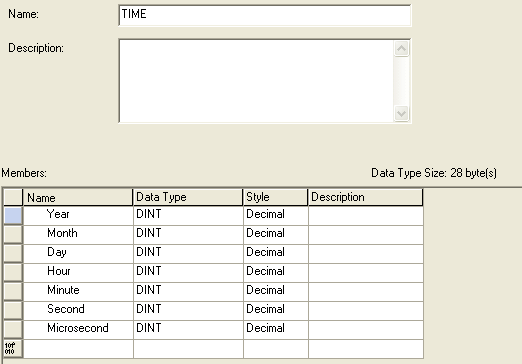
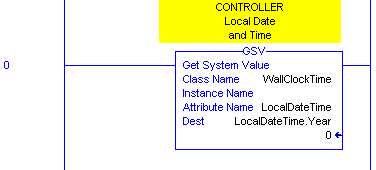
Then you just need to use the GSV (Get System Value) instruction with the WallClockTime class, and LocalSystemTime attribute to read the controller’s time into an instance of your UDT (here I created a new tag called LocalDateTime of type TIME). Note that I used the Year element of the LocalDateTime tag as the parameter, because that’s the first address of the tag. It starts writing there but fills in the entire UDT with the time values:
Now you can program your sprinklers to turn on and off in the middle of the night! 🙂
Needed something like this to transfer system time to an rsview register for an event time stamp.
still struggling with defining the tag values, and getting the proper response.
can you send me the exact step by step, I intend to use a one shot to fire it
@Steve, unfortunately I don’t have a running ControlLogix around here right now, so I can’t go online and verify it. But the steps are straightforward: create the UDT as shown above, create one (controller scrope) tag called LocalDateTime of type TIME, and then enter the GSV instruction shown above. However, you’ll need some logic to fire it. I believe it’s an asynchronous instruction, so a one-shot may not work. Check the F1 help docs to be sure.
Thanks. Worked great for me. I then used a one shot to capture the time of a reset, then Wonderware to display on my HMI.
Exactly what I couldn’t figure out thanks
Its also worthwhile noting, that if you create a new Periodic Task under Tasks, with a periodic time of around 10msec, Add a Program and subsequent LAD file, you can pull back an awful lot of wasted scan time compared to running the GSV in a Continuous Task.
GSV’s are very scan time hungry, so throwing non critical instructions into a periodic task really lightens the burden on the processor.
Works great. Thanks for the information!
Now I am wondering how to “SET” system value. Is it set to localdatetime or wallclocktime? I have firmware version 13 that can’t be upgraded, so ciptimesync won’t work?? In other words , using a Plc as the master clock, and have other plc’s sync with it aren’t possible until firmware version 18. I need to send a message to remote compact logic’s and sync time with cip messages. How is this accomplished with firmware v 13
Thanks for the information! This is exactly what I was looking for.
Hello,
I would like to compate two date, and I want to know is there is any function to date that or I should code it.
Hello,
I would like to compare two dates, and I want to know if there is a function to do that or I have to code it myself.
Thank you
thanks for your help!!
tried as per your instruction. but not getting any value which is created in UDT
USING STUDIO 5000 SOFTWARE. PLC 1756 L33ER