This is part of an RSLogix 5000 Tutorial.
The process I suggested for mapping your inputs was rather long and drawn out because we needed to deal with the problem of asynchronous I/O. The problem arises because inputs are under the control of physical processes (electricity) and communication processes (the backplane communication) that we don’t have control over.
Outputs, on the other hand, are completely under our control. That’s why I recommend a simpler approach for setting up your outputs. Where we created a distinct tag called LI01 to hold the internal state of our inputs, I suggest creating an alias tag, LO02 that aliases the existing tag Local:2:O.Data that was created when you added the output card. Just remember to add descriptions to each bit (LO02.0, LO02.1, etc.). Here’s how I’ve configured the LO02 tag in the Controller Tags:
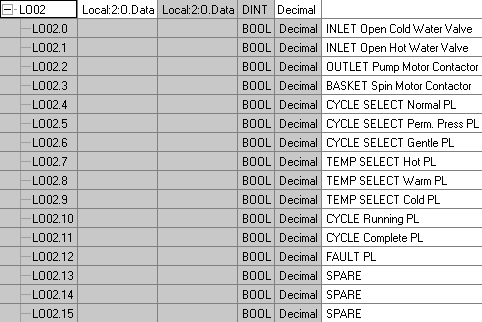
That’s it! This method has two advantages: it’s fast, and it allows you to right click on any output in your program and force it directly without having to do a cross reference. The asynchronous nature of the outputs won’t bite you as long as you only ever drive each output from a single coil (which is a good idea anyway, for readability).
Why did you have to map your outputs in the first place?
Since it’s an alias, and you are not mapping bit by bit.
What’s the purpose apart from less typing?
@Clement: As you’ve hinted at, the reason for mapping the outputs is purely syntactic sugar, but for two reasons. First, since there are good reasons for mapping the inputs, mapping the outputs like this provides consistency between the naming schemes of inputs and outputs. Secondly, many electrical specifications say that the wires connected to your I/O must be labelled with the internal I/O address in the PLC. This made sense back in the days of a SLC 500 where the output was O:4/0, but most wire labellers won’t handle Local:2:O.Data.15. LO02.15 is a bit easier to handle.
Of course, I never said you *have* to do it this way. 🙂
Nice…
What is L from LI,LO stands for? Local?
As a trainer, I’ve seen some maintenance keyboard users novices who confuses I with 1 and especially O with 0 when typing or reading.
Does some global naming standards exists? Or each company has(n’t) his own naming standard?
@ivirbin – yes L is for “Local”. When you get fieldbus’ involved I typically see “D” for “DeviceNET”, and so on. I still use I/O for input and output even though they can be confused with 1 and 0. The fact is, if you’re consistent with your naming convention, then the second letter after the L is always a letter, so in practice it’s not a big deal.
can you give me an example like which you have given to map the inputs using the alias XIC to OTE?
@Vijaya – there’s really no need. You can just use output coils directly in your program. That will speed up troubleshooting when you do a cross reference. Don’t bother using an XIC and OTE for outputs, just inputs.
please give me instructions on how to create the aliases. Everytime i try it i get the errors on the left hand side. I have created a program and named it ‘MAPOUTPUTS’, Then two routines under it called Aa_MAIN and LO02. Aa_MAIN has a JSR to call LO02. I open LO02 and make a rung. A XIC (Local:2:O.Data.0) and OTE(LO02.0). When i try to aliase the OTE to the earlier inputs (LI01.0) i get just the right naming we had given I.E (INLET COLD WATER VALVE ON) and errors. On creating a second rung the OTE keep changing their naming. What am i doing wrong. Please give me steps to create an aliase.
Do you have a sample rung of 1 output you mapped. I am still a bit confused on how to do this. Thank you.
I’m a bit confused, I’m new to this, and I don’t know if you are supposed to do this in the exact same way as with the inputs. Are you supposed to create a new routine, call it LO02 and input contact and coil 16 times again, like with the inputs? And then are you supposed to have a jsr like in Aa_Main to the LO02 routine? Or what? I was pleased with this tutorial until I got to this stage and am now feeling pretty dumb… 🙁
@Raindawg down below the table there is a little tab that says Manage Tags and another that says Edit Tags, click on edit, then go to the Alias For column and next to the LO02, in the white cell, press the little arrow and select from the list Local:2:O.Data .
If you read carefully this is not done the same way as the input tags, the author says “Here’s how I’ve configured the LO02 tag in the Controller Tags”, and that’s where you should do it, in the Controller Tags at the top of the Controller Organizer (the window on the left)
1. Right click Controller Tags choose New Tag
2. Name it LO02, from the Type choose Alias, From Alias for choose Local:2:O and click OK
3. Now the alias should show in your tag manager window, from the Edit tags (or monitor tags) tabs set the descriptions as the author suggests